
Shipping with UniUni: Pros, Cons, and EnablementUpdated 7 months ago
TL;DR + Our Advice:
There are tradeoffs, but for brands looking to reduce fulfillment and shipping costs in 2026, UniUni can be a strong fit in the right scenarios. Because UniUni can be turned on or off for your account at any time, we highly recommend brands test out a few use-cases in Q1-Q2 when the risk is low. Your Account Manager can help you monitor performance and adjust when/how UniUni is used along the way. |
What is UniUni?
UniUni is a carrier service focused on last‑mile DTC delivery for small to medium sized parcels and is built on a flexible “on‑demand driver” model.
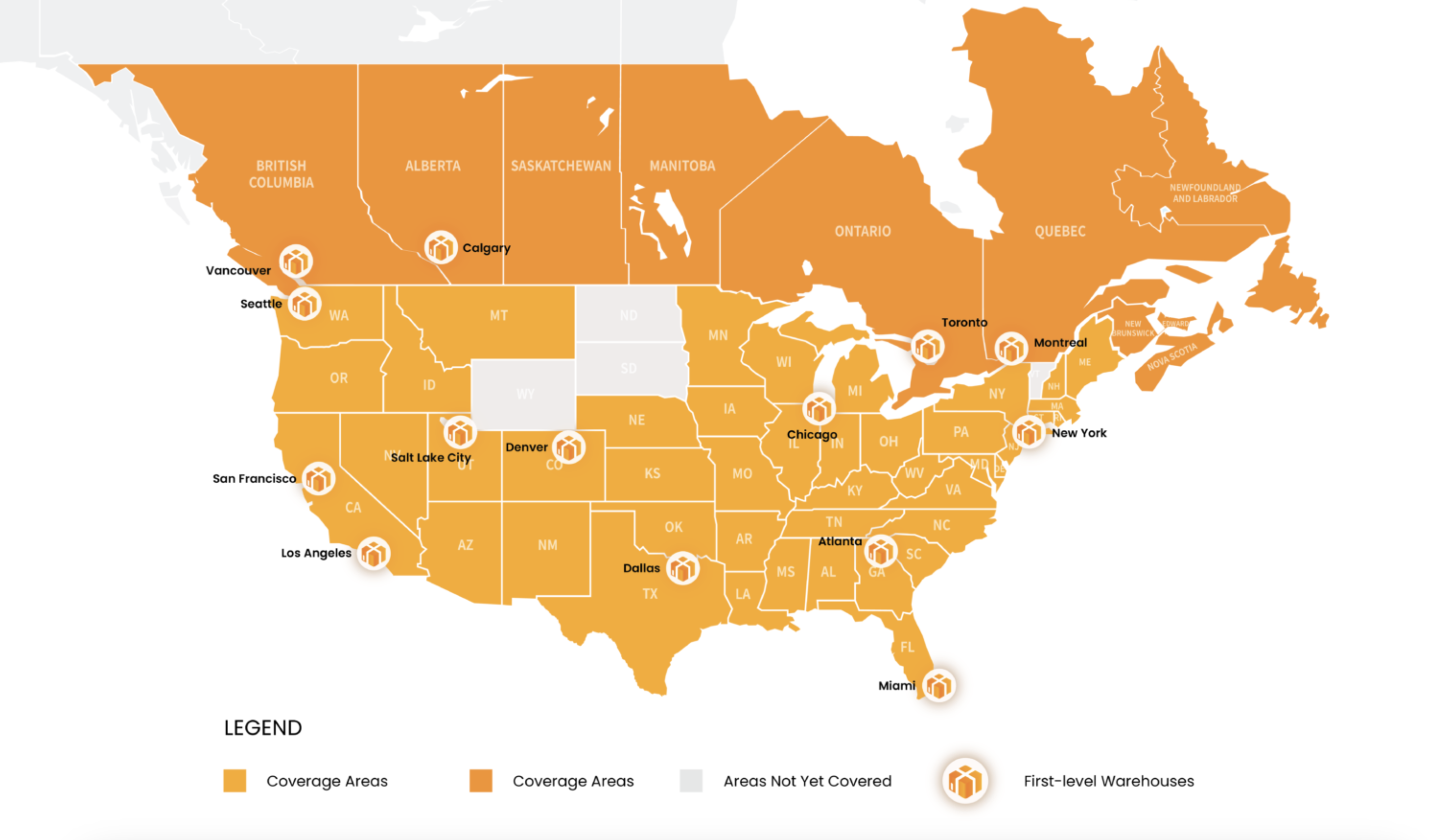
UniUni works by collecting packages at local hubs, then handing them to a network of independent drivers for the final delivery, covering 80% of Canada and 65% of the U.S. using AI-powered routing.
Below is UniUni's coverage map, as of 02/23/2026:
What UniUni is Good For
UniUni tends to work best when your priority is cost savings AND you can tolerate longer transit times. UniUni could be a potential good fit for:
- Budget-friendly shipping where delivery speed isn’t the top promise
- Lower-AOV orders where shaving cost matters more than 2-day speed
- Seasonal promos where you want a cheaper option temporarily
- Selective shipping rules (only certain zones, weights, or package types)
Like with other major carriers, customers will be able to track their packages shipped with UniUni.
Tradeoffs with UniUni
Naturally, cheaper costs comes with a downgrade in services and support. Expect the following tradeoffs when shipping through UniUni:
- Slower transit vs. USPS/UPS in many lanes.
- Example we’ve seen: PA → destination took ~6 days via UniUni vs. ~2–3 days typical on USPS/UPS for similar lanes.
- Less consistent delivery experience compared to the major carriers’ networks
- Tracking lags: UniUni typically has fewer in-network scan events than major carriers, so tracking may update less frequently. A package can look “stuck” even if it’s still moving through the network.
- Different support flow: Support + claims aren’t as streamlined as major carriers
UniUni Accountability + Claims
UniUni is a cost-saving carrier option, but it doesn’t offer the same service levels as major carriers. If you enable UniUni, please note that Nice Commerce is not responsible for:
- Transit time performance (delays, late deliveries, missed delivery windows)
- Carrier exceptions or disruptions (weather, routing issues, facility backlogs, etc.)
- Lost packages in transit
- Since there are fewer in-network scans, packages can look "stuck" or lost even when they're moving through the network.
While Nice can file claims and escalations on your behalf with UniUni, we cannot guarantee a successful outcome.
How to Activate UniUni & Control When It’s Used
UniUni isn’t turned on by default. If you’d like to use it, you’ll need to request activation for your specific account and specify when the carrier service should apply.
To enable:
Tell your Account Manager you want UniUni activated for your account.
We’ll confirm you understand the tradeoffs (speed + support responsibilities).
We enable UniUni and confirm what shipments it should apply to.
Options for usage:
We can set up UniUni to run broadly or for specific use cases. We can also easily turn the service on and off for seasonal and temporary use. Below are common ways you can implement UniUni into your carrier mix:
- Always available (broadest use)
UniUni shows up as a carrier option in “Cheapest Ever” rate shopping for packages going to eligible delivery areas. - Seasonal/temporary
UniUni can be toggled on or off at any time, including for seasonal demand, promotional campaigns, or limited-time testing. - Rule-based (“only use it when…”)
Examples of rules we can set up:- Only for certain zones/regions
- Only under a specific order value
- Only for product exchanges
- Only for non-urgent service tiers
- Only under or over a specific weight threshold
If you tell us what you’re optimizing for (cheapest label, protect reviews, reduce WISMO tickets, etc.), we can suggest the best rules and routes to apply.
Frequently Asked Questions:
- Will shipping through UniUni be cheaper than with a traditional carrier?
Oftentimes, yes. That’s the main reason brands use it. But the savings come with slower/less predictable transit vs. major carriers. - Will my customers be able to track UniUni packages?
Yes, UniUni provides tracking for customers and brands on their website. Note that UniUni uses less scanning touchpoints than traditional carriers, so there may be lags in tracking updates. - Can I turn UniUni off later?
Yes. We can enable/disable it at the account level at any time. - What if a package is delayed or lost with UniUni?
Your team can manage support tickets and claims directly with UniUni. If a package looks genuinely stuck/lost, reship sooner rather than waiting on a claim to resolve. It’s usually the fastest way to protect the customer experience.